Top Twitter Video Creation Tools
Creating engaging videos for Twitter (x) can be a breeze with the right tools. Here are some top picks to help you get started.
Benefits of Using Video Tools on Twitter (X)
Using video tools on Twitter can greatly enhance your content. Video is now a big deal on platforms like Twitter, and using the right tools can help you create engaging and professional-looking videos. Here are some benefits:
Enhanced Engagement: Videos are more likely to be watched and shared compared to text-based posts.
Professional Quality: Tools offer features like filters, transitions, and text overlays to make your videos look polished.
Time-Saving: Many tools come with templates and easy-to-use interfaces, making the video creation process quicker.
Types of Twitter Video Tools
There are several types of Twitter video tools available, each serving different purposes:
Video Creation Tools: These tools help you create videos from scratch.
Editing Tools: These are used to edit existing videos. They offer features like trimming, adding effects, and more.
Analytics Tools: These tools help you understand the impact of your video strategy by providing metrics like views, watch time, and engagement rates.
Monetization Tools: These tools help you make money from your videos by connecting you with advertisers.
1 - Caply
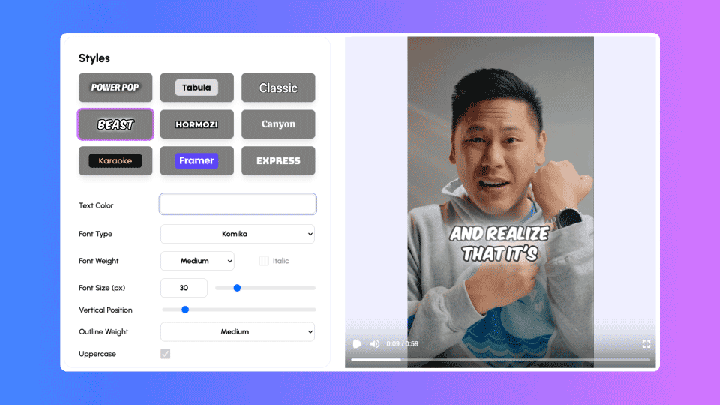
With Caply Create designer AI video captions in 1 click.
Create your video captions in under 2minutes. Save hours of work every week.
You can effortlessly add video captions to your Twitter videos, that captivate your audience just like Alex Hormozi’s, elevating your content to new heights.
With Caply, you can forget about the hassle of spending hours on video editing to create captions.
Instead, you can focus on what truly matters—crafting your message and engaging with your viewers. Start using Caply today and watch your Twitter presence grow!
Key Features:
- AI-generated captions added automatically to videos.
- Quick and easy three-step process: Upload, Customize, and Share.
- Customizable caption styles with options to add logos.
- SEO-ready transcripts to boost search engine visibility.
- Download watermark-free videos in formats optimized for social media.

2 - Animstats
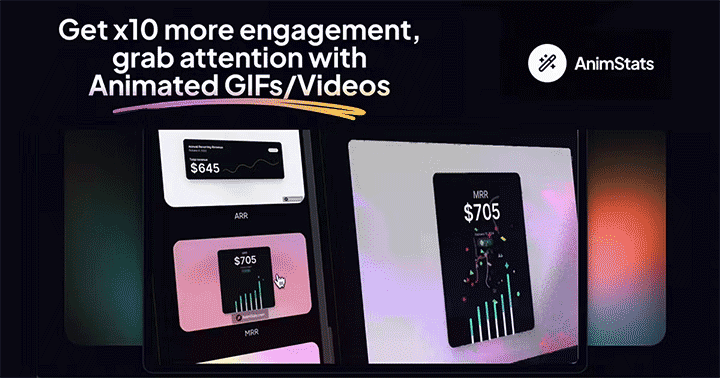
Transform data into captivating animations instantly.
AnimStats is a powerful tool that enables users to convert raw data into stunning animated GIFs and videos in under a minute. Designed to enhance engagement, especially on social media, AnimStats helps users turn otherwise static statistics into dynamic, eye-catching visuals. Whether you’re a marketer, content creator, or educator, AnimStats provides an easy and efficient way to make your data more appealing and keep your audience captivated.
Key Features
- Instantly create animated GIFs and videos from data.
- Boosts engagement by up to 10x on social media.
- User-friendly interface for quick, hassle-free creation.
- Perfect for marketers, educators, and content creators.
- Enhances the visual appeal of data presentations.

3 - Screen Studio
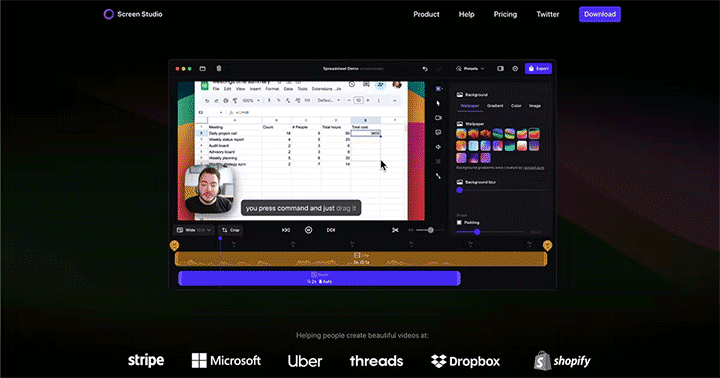
Effortless, beautiful screen recordings for macOS.
Screen Studio is a specialized screen recorder designed for macOS users, offering an intuitive and automatic way to create high-impact videos. The twittertool is opinionated, ensuring your videos always look professional with minimal effort. It automatically zooms in on the main action, enlarges the cursor, and smooths its movements, making it ideal for tutorials and presentations.
With features like automatic zoom and vertical mode export for social media, Screen Studio eliminates the need for manual editing, transforming time-consuming tasks into instant effects.
Key Features:
- Automatic zoom-in on screen actions.
- Cursor size enhancement and movement smoothing.
- Vertical mode export for social media.
- Designed for macOS with a focus on simplicity.
- Automatically generates professional-looking videos.

4 - Eleven Labs

Eleven Labs is a powerful AI tool that turns text into speech. It offers many features to create lifelike voices. This guide will show you how to use Eleven Labs and get the most out of it.
Eleven Labs proves to be a game-changer in the realm of speech synthesis. Its user-friendly interface and powerful features make it accessible for everyone, from beginners to experts.
Whether you’re creating content, enhancing accessibility, or just exploring the possibilities of AI, Eleven Labs offers tools that are both versatile and effective.
By mastering this technology, you can bring your projects to life with realistic and engaging audio. Dive into the world of Eleven Labs and unlock new creative potentials today!
Exploring the Core Features of Eleven Labs
- Ultra-realistic Text to Speech and AI Voice Generation.
- Supports multiple voices, styles, and languages.
- Context-aware intonation and inflections.
- Ideal for content creators, businesses, and everyday users.
- Low-latency audio tools for real-time applications.

5 - X Media Studio

X Media Studio – manage, measure, and monetize your X content seamlessly.
As part of its robust offerings, X Media Studio includes powerful Twitter tools for video management, making it easy for content creators to enhance their media strategy. Whether you’re uploading high-quality content or using third-party apps like Twit Vid to share engaging clips, X Media Studio ensures that you can maximize your reach.
The platform features tools like Producer, Monetization, Analytics, and Library, making it a one-stop solution for content creators and brands aiming to maximize their impact on X.
From simplifying media management to driving revenue through Amplify Pre-roll and Sponsorships, X Media Studio provides the tools needed to enhance your storytelling and reach.
Key Features:
- Manage: Upload, organize, and publish content across multiple X accounts.
- Measure: Track content performance with comprehensive analytics.
- Monetize: Generate revenue through Amplify Pre-roll and Sponsorships.
- Library: Centralized media library for organizing and sharing videos, GIFs, and images.
- User Roles: Assign roles and permissions for seamless team collaboration.

6 - Canva
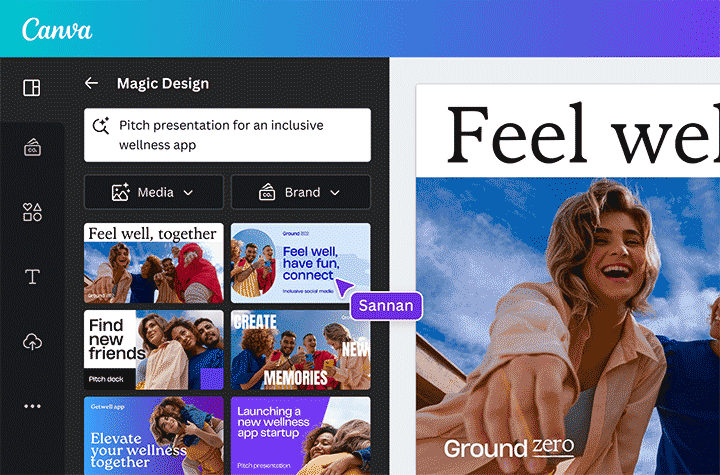
Effortless design for everyone, from beginners to pros.
Canva is an intuitive online graphic design tool that empowers users to create a wide variety of creative assets with ease. Whether you’re designing social media posts, presentations, posters, videos, or logos, Canva makes it simple for anyone to produce beautiful, professional-quality work.
With its user-friendly interface, Canva is ideal for both beginners and seasoned designers looking to enhance their skills. From social media images and videos to websites and multimedia presentations, Canva is a versatile platform that helps users bring their creative visions to life.
Key Features:
- Design a wide range of assets: social media posts, videos, logos, and more.
- User-friendly interface suitable for all skill levels.
- Extensive library of templates and design elements.
- Ideal for creating both digital and print materials.
- Access to tutorials and guides for beginners.

7 - Wideo

Convert tweets into captivating videos effortlessly.
Wideo’s “Tweet to Video” tool offers a simple and efficient way to transform your tweets into engaging videos. By incorporating motion graphics and visuals, this tool turns ordinary tweets into eye-catching audio-visual content, perfect for expanding your influence and reach across social networks.
Videos generate more likes and shares than text or images, making this feature ideal for enhancing your social media presence. With just a few clicks, you can convert your tweets into videos, ready to share across all platforms.
Key Features
- Converts tweets into videos with motion graphics.
- Supports inclusion of images and videos from your tweets.
- Quick and easy process—just fill out a form with your tweet URL.
- Enhances social media engagement with more shareable content.
- Delivers videos directly to your email in mp4 format.

8 - Epidemic Sound

Elevate your content with world-class music and sound effects.
Epidemic Sound offers creators access to the largest music and sound effects catalog of its kind, used over 2.5 billion times daily across the globe. Designed to enhance any type of content, Epidemic Sound provides a seamless soundtracking experience with exclusive tools and a direct license model that includes all rights. Whether you’re working on a global brand campaign or a personal project, Epidemic Sound empowers you to add the perfect audio elements to your creations, ensuring your stories resonate with audiences worldwide.
Key Features:
- Extensive catalog of music and sound effects across all genres.
- All rights included with a direct license model for worry-free publishing.
- Soundtracking tools designed for professional creators and brands.
- Supports a wide range of content types and platforms.
- Collaborates with artists, composers, and producers to continually enrich its catalog.

9 - Giphy

Giphy is the world’s largest library of animated GIFs and stickers, making it the go-to platform for users to express themselves in fun and creative ways. Whether you’re looking to enhance your social media posts, messages, or presentations, Giphy offers a vast collection of content that spans every imaginable category and emotion.
With a user-friendly interface, Giphy allows users to search, create, and share GIFs and stickers effortlessly. The platform also supports integration with various apps, making it easy to add a touch of animation to your digital interactions.
Key Features:
- Extensive library of animated GIFs and stickers.
- Search by keyword, category, or emotion.
- Create custom GIFs with Giphy’s GIF maker.
- Seamless integration with social media platforms and messaging apps.
- Free to use with content available for all occasions.

Future Trends in Twitter Video Tools
AI and Automation
Artificial Intelligence (AI) and automation are set to revolutionize Twitter video tools. AI can help in automating video editing tasks, making it easier for users to create high-quality content quickly. For instance, AI can automatically trim videos, add filters, and even suggest the best times to post based on user engagement data.
Integration with Other Platforms
Integration with other platforms is becoming increasingly important. Tools that allow seamless sharing of videos across multiple social media platforms, including Twitter, will be highly sought after. This not only saves time but also ensures consistent branding across different channels.
Emerging Video Formats
New video formats are emerging, offering more ways to engage audiences. Vertical videos, for example, are gaining popularity as they are more suited for mobile viewing. Additionally, animated GIFs and short clips are becoming more common.
The future of Twitter video tools looks promising, with advancements in AI, better integration capabilities, and new video formats leading the way.
Boost Engagement with Dynamic Captions
With 80% of social media videos watched on mute, captions are crucial for capturing attention.
They enhance accessibility, keep viewers engaged, and ensure your message gets across even without sound.
Caply makes it easy—instantly add auto-generated captions to your videos in just a few clicks.
Elevate your content and engage your audience effectively with Caply.